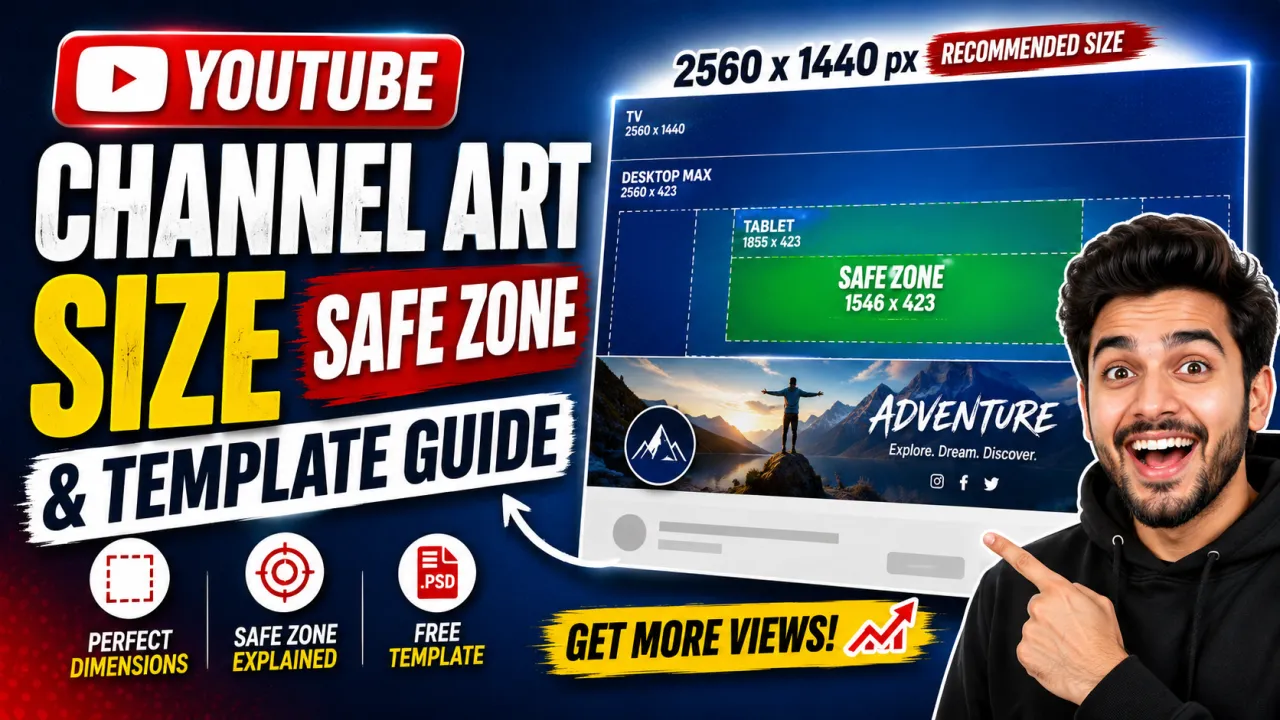
YouTube channel art also called the channel banner, YouTube banner, or cover photo, and shown across the top of a channel page has a recommended size of 2560×1440 pixels in a 16:9 aspect ratio, with a maximum file size of 6 MB. The hard part is not the canvas size; it is that YouTube crops that single image differently on every device. This guide covers the exact channel art dimensions, the all-important safe zone, the per-device crops, and the design rules that keep your branding visible everywhere.
Recommended YouTube Channel Art Size
Upload your channel art at 2560×1440 pixels. This is YouTube's recommended resolution and the only size that gives you full control over how the banner looks on every screen. The aspect ratio is 16:9, the same widescreen ratio used by standard video thumbnails. The maximum file size is 6 MB, and YouTube accepts JPG, PNG, GIF, and BMP uploads, converting and serving the final banner as a JPG. Designing at the full 2560×1440 canvas rather than a smaller image scaled up means your text and logo stay sharp on large TV displays.
The 1546×423 Safe Zone
The single most important number in channel art design is the safe zone: 1546×423 pixels, centered in the 2560×1440 canvas. This is the only region guaranteed to be visible on every device, from a phone to a TV. Anything you place outside the safe zone in the corners, along the top and bottom edges, or far to the left and right will be cropped on smaller screens. Put your channel name, logo, tagline, and upload schedule inside the safe zone, and treat the area outside it as decorative background that may or may not be seen.
How Channel Art Is Cropped on Each Device
YouTube serves the same 2560×1440 file everywhere but displays a different crop depending on the screen. Understanding these crops is what separates a banner that looks intentional from one that looks broken.
| Device | Visible area | What this means |
|---|---|---|
| TV / Smart TV | 2560×1440 px (full) | The only device that shows the entire banner |
| Desktop | 2560×423 px | A wide, short central strip of the full image |
| Tablet | 1855×423 px | A narrower central crop |
| Mobile | 1546×423 px (safe zone) | The most restrictive crop equal to the safe zone |
The pattern is consistent: every device keeps the same vertical center band (423 px tall) and trims the width. That is why critical content must sit in the centered safe zone it is the common area across all four crops.
Designing Channel Art That Survives Every Crop
Once you know the safe zone and the device crops, the design rules follow naturally. These principles keep your banner readable from a 24-inch monitor down to a phone:
- Keep all text and logos in the 1546×423 safe zone. Center your channel name and any tagline here so they never get clipped on mobile.
- Use the outer area for atmosphere only. Background texture, gradients, or imagery can fill the full 2560×1440 canvas, but nothing essential should live there.
- Maximize contrast. Your banner sits above both light and dark YouTube themes; high-contrast text with a subtle shadow stays legible in both.
- Limit yourself to one or two fonts. The visible strip is short, so a single bold headline plus one supporting line is plenty.
- Echo your brand color. Repeat the signature color from your thumbnails so your channel art, thumbnails, and avatar read as one brand.
To set your artwork to the exact canvas, the YouTube thumbnail resizer includes a 2560×1440 channel art preset that crops and scales any image to spec.
Channel Art vs Profile Picture vs Thumbnail
Channel art is one of three core YouTube image assets, and each has its own size. The banner is 2560×1440, the profile picture (avatar) is 800×800 and displayed as a circle, and the video thumbnail is 1280×720. Keeping all three visually consistent same colors, same typeface family is what builds brand recognition in search and feeds. For the avatar specifically, see the YouTube profile picture size guide, and for every dimension in one table, the YouTube image sizes guide.
Download or Replace Existing Channel Art
If you want to study a channel banner or cover photo that is already live your own or a competitor's you can grab it at full resolution with the YouTube channel art downloader, and the step-by-step method is in how to download YouTube channel art. Use it to check the true source dimensions of any banner before redesigning your own.
Sources
The dimensions, safe-zone measurement, and file-size limit follow YouTube's official guidance in YouTube Help Add channel art.
Frequently Asked Questions
YouTube recommends 2560x1440 pixels in a 16:9 aspect ratio, with a maximum file size of 6 MB. Keep all important content within the centered 1546x423 pixel safe zone so it stays visible on every device from mobile to TV.
The safe zone is the centered 1546x423 pixel region of the 2560x1440 banner. It is the only area guaranteed to be visible on all devices. Place your channel name, logo, and tagline inside it; anything outside is cropped on tablets and phones.
YouTube crops the same 2560x1440 banner differently per device. TV shows the full image, desktop shows a 2560x423 strip, and mobile shows only the central 1546x423 safe zone. Anything outside that central strip is cropped on phones, so keep all critical branding inside the safe zone.
YouTube accepts JPG, PNG, GIF, and BMP uploads for channel art with a maximum file size of 6 MB, and serves the final banner as a JPG. Use PNG for graphic or text-heavy designs to keep edges crisp, and JPG for photographic banners.
No — Channel art is 2560x1440 pixels and a video thumbnail is 1280x720 pixels. Both use the 16:9 aspect ratio, but the banner is far larger because it must look sharp on TV displays. The profile picture is different again at 800x800 pixels.
Yes — "Channel art", "channel banner", "YouTube banner", "cover photo", and "header image" are all names for the same image: the wide banner across the top of a channel page. Its recommended size is 2560x1440 pixels with a centered 1546x423 safe zone, regardless of which term you use.